Showing posts with label KVM. Show all posts

Wednesday, October 14, 2015

How are OVS, OVN, OVSDB and OpenFlow related?

We have seen these OVS, OVN, OVSDB and OpenFlow in various technology articles.  Do you know how they are related?  Or are they related at all?

Well, they all start with the letter "O", this will be great for a Sesame Street episode for us to learn words with the letter "O".  

They all start with the letter O because they are all have "open" in their name.

With "open" in their name, does that make them related?

OVS, OVN, OVSDB and OpenFlow are related but not because they have "open" in their name.

Before we look at how they are related let us take an overview of what they are and some of the key concept that we need to know.  We can only take an overview of OVS, OVN, OVSDB and OpenFlow in this post as they by itself can be one or more blog post to cover.


OVS


OVS is the short form of Open vSwitch.  It is an open source software based virtual network switching module that can be deployed on hypervisor such as KVM or white box switching hardware.   Detail description of OVS can be found on it homepage and GitHub page. 

A list of OVS feature can be found here.  The latest version is release 1.5

OVS is heavily used in OpenStack as KVM is the most deployed hypervsior for OpenStack while OVS is the default virtual switching module for KVM.

This diagram from OVS home page describe what OVS is:
image source: http://openvswitch.org/

As you can see both OpenFlow and OVSDB is related to OVS.  Will discus this in more detail later in this post.


OVN


OVN stands for Open Virtual Network and is pronounced as "oven".  This is why the logo looks like the front of an oven.  It is a sub-project within OVS.

Back in March 2015, I have already written an article on OVN.  Please refer to this post for OVN details.

OVSDB

OVSDB is a protocol. It stands for Open vSwtch Database Management protocol. It is used to manage an Open vSwitch. This is the management plan for Open vSwitch. It is defined in RFC 7047.

The heart of OVSDB is the database or schema that defines the configuration of the OVS as well as the QoS policies. Management module uses the JSON-RPC as the transport to communicate with the ovsdb-server module of the OVS. (note: JSON = JavaScript Object Notation and JSON-RPC is a Remote Procedural Call encode in JSON format).

OpenFlow

OpenFlow is a protocol.  It is one form of  control plane for Open vSwitch and is defined in RFC 7149.

The main idea is to setup flow table that defines the action of a particular flow.  The basic action types are forward and drop with other optional/recommended actions such as flood, enqueue or modify field.  

This diagram explains the Flow Table:
 

Putting OVS, OVN, OVSDB and OpenFlow together

This diagram summarize the relationship between OVS, OVSDB and OpenFlow

At this time OVN is part of OVS and uses the same interface ovsdb-server and ovs-vswitchd:

Summary

Both OVS and OVN are open source switching modules with OVSDB as the management plane and OpenFlow is used to program the flow from the controller to the OVS.
                             

Saturday, July 11, 2015

KVM – a free and yet powerful hypervisor


Setting up a home lab had been a struggle for me because of budget.  A few years back after I passed the VCP 4 and 5 (I passed both within a week because I have to take advantage of the free VCP upgrade exam) I was so happy to have my copy of VMware Workstation.  With the VMware Workstation I can run virtual machine on my Windows 7 server (Dell T110 with 16G memory).  I think a few years back VMware Workstation is the best to offer as a hypervisor for the home lab.

VMware is doing a great job not only on it server virtualization product but also has pushed other hypervisor maker to produce better product.  As a software developer I used Unix as a development platform for a long time.  Lately with my involvement with OpenStack I get to play with Ubuntu a lot more.  The biggest step that I have taken is bought for myself a laptop where I can dual boot Windows 8.1 and Ubuntu desktop.  As I have used Ubuntu more and more I have discovered that KVM is a very powerful hypervisor and yet it is free.

 image source: http://www.linux-kvm.org/kvmless/kvmbanner-logo3.png

How does KVM work?
KVM stands for Kernel-based Virtual Machine. KVM is part of the Linux Kernel since version 2.6.20.  

KVM turns the Linux Kernel into a Type 1 hypervisor.  This is an essential characteristics of KVM.  Difference between Type 1 and Type 2 hypervisor can be found here

In Linux term the hypervisor is known as Virtual Machine Monitor (VMM).

Wikipedia has a good picture on how KVM works:
image source: https://en.wikipedia.org/wiki/Kernel-based_Virtual_Machine#/media/File:Kernel-based_Virtual_Machine.svg

To understand how KVM works there are 3 key concepts that we need to understand:
  1. kvm.ko - a module in the Linux kernel
  2. QEMU - short for Quick Emulator 
  3. Guest Mode
kvm.ko
kvm.ko is the driver in the Linux kernel that interacts with the guest operating system of the virtual machine that is running on the user space of the host operating system.  This driver consists of 3 files:
  • kvm.ko - provides the core virtualization infrastructure
  • kvm_intel.ko - specific to the Intel processor
  • kvm_amd.ko - specific to the AMD processor
It used to be a loadable module and starting from Linux version 2.6.20, this module is part of the mainline module.

On your Linux host machine, with the modprobe command we can see:

atc@atc-OptiPlex-740:~$ modprobe -l | grep kvm
kernel/arch/x86/kvm/kvm.ko
kernel/arch/x86/kvm/kvm-intel.ko
kernel/arch/x86/kvm/kvm-amd.ko


kvm.ko is responsible for switching the host processor into the "Guest" mode.

QEMU


image source: https://dw1.s81c.com/developerworks/mydeveloperworks/blogs/a2674a1d-a968-4f17-998f-b8b38497c9f7/resource/BLOGS_UPLOADED_IMAGES/Screenshot-2012-07-0615%3A53%3A40.png

The correct term should be qemu-kvm.  There is the regular QEMU (Quick Emulation) that does machine emulation to run guest operating system on a Linux machine.  The regular QEMU is making the host Linux machine a Type-2 hypervisor.  KVM make use of the regular QEMU framework to host the guest operating system and make changes to interact with the kvm.ko module in the kernel of the host Linux machine. To install KVM on a Ubuntu system we have to install the qemu-kvm package.  Since qemu-kvm and QEMU are so close together that a lots of people use QEMU as a generic name for the module that runs the guest operating system. 

Guest Mode
Linux has the concept of user mode and kernel mode.  This blog has good information on these 2 modes.  KVM introduce a third mode - Guest Mode:
This is where the guest operating system can have its own user and kernel mode while running at the user mode of the host Linux system under qemu-kvm.

Guest mode is implemented as a hardeare file - /dev/kvm which acts as an interrupter between the actual hardware of the host system and the VMM. When KVM is install you will see:

atc@atc-OptiPlex-740:/dev$ l -lt /dev/kvm
crw-rw----+ 1 root kvm 10, 232 Jul 10 10:33 /dev/kvm


                               image source: http://www.linuxjournal.com/files/linuxjournal.com/linuxjournal/articles/102/10251/10251f1.jpg

For a more detail description of the guest-mode, The Linux Journal has a good article here.

KVM features
It is true that KVM is free and is efficient but what feature does it offer?  Is KVM enterprise ready?

This KVM page has a list of KVM feature but with a commend saying it is not the complete list of features for KVM.  Live migration is one of the list feature and I believe this is a very important, attractive, fundamental  and necessary feature for KVM to be enterprise ready.

When it comes to Linux and enterprise, Red Hat has its RHEV (Red Hat Enterprise Virtualization) and is being used in various data centers.  Canonical Ltd is the company behind Ubuntu is catching up on its "enterprise ready" distribution.

SUSE which is popular in Europe also has it version of "enterprise ready" distribution.

I will in another blog post compare these 3 versions of Linux distribution that has value-add feature for KVM for commercial use.


Management for KVM
This page has a list of ways to manage KVM.  This page is pretty up-to-date because I see Platform9 being listed.  Platform9 is a new startup that ship product to manage OpenStack.

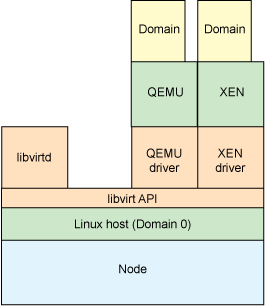
Most management tool be it web based (e.g. oVirt by Red Hat), GUI based (e.g. virt-manager) or command line (e.g. virsh) used libvirt as the interface to manage KVM.

libvirt
I found an excellent article that explain libvirt in detail.  It explains what libvirt is and lists out some major function of libvirt. In the article it also explains how to install and configure libvirt.

IBM blog has a good article on libvirt. Again a picture is worth a thousand words, this diagram explain how libvirt fit into KVM management:
image source: http://www.ibm.com/developerworks/library/l-libvirt/figure3.gif

How to install KVM
There are lots of blog post covering how to install KVM.  I have followed this post to install KVM on my Ubuntu laptop.  One basic prerequisite to run KVM is that the hardware that your Linux is running supports hardware virtualization.  This can easily be find out by typing this on the terminal of a Linux machine.

 egrep -c ‘(svm|vmx)’ /proc/cpuinfo

If it returns a non zero value, the hardware supports hardware virtualization and we can run KVM on this machine.

For working with KVM guest, this post by Scott Lowe is a good start.

Give KVM a try
Personally, KVM is a very good tool for my home lab.  I believe it is also a good option for commercial deployment of  virtualization or cloud infrastructure.  KVM is the most used hypervisor for OpenStack as of today.  (Note: it seems container is becoming more and more popular and lots of development effort is being put in by individual contributors and vendors to make container "enterprise ready" for the virtualization or cloud infrastructure so let see if container will replace KVM).

Tuesday, November 4, 2014

OpenStack Series: Part 4 – Nova – Compute Service

Nova is the module that handles the management of virtual machine instances in the OpenStack infrastructure by being an abstraction layer that interfaces with supported hypervisors

A list of supported hypervisors for Nova can be found here.  Supported hypervisor includes the KVM (libvirt/QEMU), ESXi from VMware, Hyper-V from Microsoft and XenServer.  It is interested to know that Nova categorize the hypervisors into 3 groups based on the number of testing done with the drivers that interface with the hypervisor.

Group A

These drivers are fully supported. Test coverage includes:
  • unit tests that gate commits
  • functional testing that gate commits
Drivers in this group include:
  • libvirt (qemu/KVM on x86)

Group B

These drivers are in a bit of a middle ground. Test coverage includes:
  • unit tests that gate commits
  • functional testing providing by an external system that does not gate commits, but advises patch authors and reviewers of results in gerrit (the code review system).
Drivers in this group include:
  • Hyper-V
  • VMware
  • XenServer 6.2

Group C


These drivers have minimal testing and may or may not work at any given time. Use them at your own risk. Test coverage includes:
  • (maybe) unit tests that gate commits
  • no public functional testing
Drivers in this group include.
  • baremetal
  • docker          <- I believe due to popularity, Docker is coming back in Kilo.
  • Xen via libvirt
  • LXC via libvirt
NOTE: Drivers in Group C will be deprecated by the Icehouse release. See DeprecationPlan for details.

I think the hypervisor technology is the most matured for VMware's ESXi/vCenter Server.  However, user has to pay licensing fee.  On the other hand, KVM is free with Linux and is becoming more and more "enterprise ready".  Of course if we compare the feature between VMware, KVM the number will favor ESXi.  We have to take into consideration that not all the features are necessary for most enterprise requirement and user will have to decide which hypervisor has the best ROI (Return on Investment).

The Nova Developer Guide has a good description of the sub-components that make up of Nova services: 
Nova consists of seven main components, with the
  1. Cloud Controller component representing the global state and interacting with all other components.
  2. API Server acts as the Web services front end for the cloud controller.
  3. Compute Controller provides compute server resources,
  4. Object Store component provides storage services.
  5. Auth Manager provides authentication and authorization services.
  6. Volume Controller provides fast and permanent block-level storage for the compute servers.
  7. Network Controller provides virtual networks to enable compute servers to interact with each other and with the public network.
Scheduler selects the most suitable compute controller to host an instance.

This diagram shows the inter-relationship of the different Nova components.


image source: http://docs.openstack.org/developer/nova/_images/Novadiagram.png

Please note that Message Queue and back-end database are also vital to the operation of Nova.

For Message Queue, it can be any AMPQ message queue but the more popular ones used by OpenStack are RabbitMQ, Apache Qpid (used by Red Hat OpenStack) and ZeroMQ.

For back-end database, the popular used in OpenStack are sqlite3, MySQL or PostgreSQL.

An article by Ken Pepple describes Nova very well in three sentences along with a diagram:
This complicated, but not overly informative, diagram as it can be summed up in three sentences:
  • End users (DevOps, Developers and even other OpenStack components) talk to nova-api to interface with OpenStack Nova
  • OpenStack Nova daemons exchange info through the queue (actions) and database (information) to carry out API requests
  • OpenStack Glance is basically a completely separate infrastructure which OpenStack Nova interfaces through the Glance API
- See more at: http://ken.pepple.info/openstack/2011/04/22/openstack-nova-architecture/#sthash.I0qjs82T.dpuf

  • End users (DevOps, Developers and even other OpenStack components) talk to nova-api to interface with OpenStack Nova
  • OpenStack Nova daemons exchange info through the queue (actions) and database (information) to carry out API requests
  • OpenStack Glance is basically a completely separate infrastructure which OpenStack Nova interfaces through the Glance API


image source: http://ken.pepple.info/openstack/2011/04/22/openstack-nova-architecture/

Nova-networking is still being use in some use cases.  User can choice between using nova-networking or Neutron.

This is only an brief introduction for OpenStack Nova.  There are a lot more in OpenStack Nova that we can look into and I will share more on this topic in the coming days.


Related Post:
OpenStack Series:Part 1  How do you look at OpenStack?
OpenStack Series:Part 2  What’s new in the Juno Release
OpenStack Series:Part 3  Keystone – Identity Service
OpenStack Series: Part 5  Glance - Image Service
OpenStack Series: Part 6  Cinder - Block Storage Service
OpenStack Series: Part 7  Swift - Object Storage Service
OpenStack Series: Part 8  Neutron - Networking Service
OpenStack Series: Part 9  Horizon - a web based UI Service
OpenStack Series: Part 10 Heat - Orchestration Service
OpenStack Series: Part 11 Ceilometer - Monitoring and Metering Service
OpenStack Series: Part 12 Trove - Database Service
OpenStack Series: Part 13 Docker in OpenStack
OpenStack Series: Part 14 Sahara - Data Processing Service
OpenStack Series: part 15 Messaging and Queuing System in OpenStack
OpenStack Series: Part 16 Ceph in OpenStack
OpenStack Series: Part 17 Congress - Policy Service
OpenStack Series: Part 18 Network Function Virtualization in OpenStack
OpenStack Series: Part 19 Storage Polices for Object Storage
OpenStack Series: Part 20 Group-based Policy for Neutron
Reference:
"HypervisorSupportMatrix." - OpenStack. N.p., n.d. Web. 04 Nov. 2014.
"Nova Concepts and Introduction¶." Nova Concepts and Introduction — Nova 2012.1.2-dev Documentation. N.p., n.d. Web. 04 Nov. 2014.
"Ken Pepple." OpenStack Nova Architecture. N.p., n.d. Web. 04 Nov. 2014.