Monday, November 3, 2014

OpenStack Series: Part 3 – Keystone – Identity Service

Keystone provide the identity service for the entire OpenStack infrastructure.  OpenStack Administration Guide defines OpenStack Identity Service as:
  • Tracking users and their permissions
  • Providing a catalog of available services with their API endpoints

In essence, Keystone is to provide authentication and authorization function for the various elements in OpenStack.  User presents a credential to Keystone and based on the result of the authentication process assign a role along with a token to the user.  This role specifies the rights and/or privileges to perform different operations within OpenStack.

User can be a
  • person 
  • service (e.g. Nova, Cinder, Neutron ...)
  • end point (a network-accessible address such as a URL, RESTful API)

User can be grouped together as Tenant which can be a project, group or organization.

Keystone assigns a tenant and a role to a user.  A user can have different roles in different tenants.

This diagram show the flow of an authentication process


image source: https://senecacd.files.wordpress.com/2012/11/identity-diagram.png

From the OpenStack Developer Guide, Keystone is organized as a group of internal services exposed on one or many endpoints.  The internal services are:

Identity

  • The Identity service provides auth credential validation and data about Users, Groups, Projects, Domains and Roles, as well as any associated metadata.
  • In the basic case all this data is managed by the service, allowing the service to manage all the CRUD associated with the data.
  • In other cases, this data is pulled, by varying degrees, from an authoritative backend service. An example of this would be when backending on LDAP. See LDAP Backend below for more details.

Token

  • The Token service validates and manages Tokens used for authenticating requests once a user’s credentials have already been verified.

Catalog

  • The Catalog service provides an endpoint registry used for endpoint discovery.

Policy

  • The Policy service provides a rule-based authorization engine and the associated rule management interface.
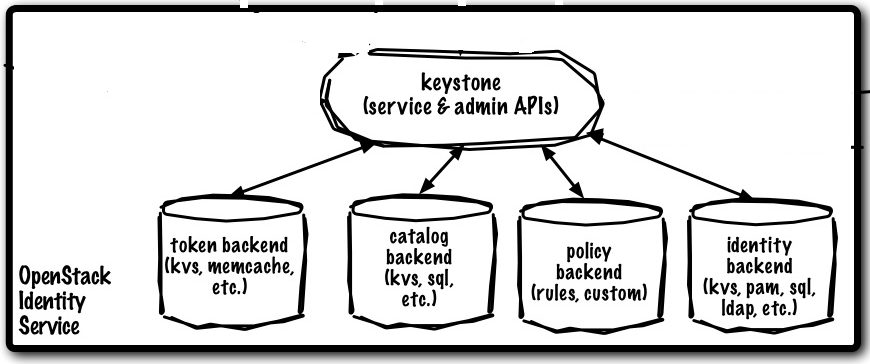
 image source: http://allthingsopendotcom.files.wordpress.com/2014/07/keystone.png

Each of these internal services can be configured to use a service back-end.  IBM has a good article explaining the components of Keystone in which it outlines some of the more common back ends include:
  • Key Value Store. An interface supporting primary key lookups, such as an in-memory dictionary.
  • Memcached. Distributed memory caching system
  • Structured Query Language (SQL). Uses SQLAlchemy (a Python SQL toolkit and Object Relational Mapper) to store data persistently
  • Pluggable Authentication Module (PAM). Uses the local system's PAM service to authenticate
  • Lightweight Directory Access Protocol (LDAP). Connects via the LDAP to a back-end directory, such as Active Directory®, to authenticate users and obtain role information

Lastly, as mentioned in my other port, one new feature for OpenStack Juno release is the federation of identity services.  If you are interested take a look here.  Instead of a single identity service,a wide range of identity services distributed around the Internet, called Identity Providers (IdPs). The advantages of using external identity providers are numerous, and include:

  •  No need to provision user entries in Keystone, since the user entries already exist in the IdP's databases.
  •  No need to build additional authentication mechanisms into Keystone, since the IdPs take care of authenticating their own users using whichever technologies they deem to be appropriate. So multiple authentication technologies are already in use.
  • No need to support users who forget their passwords. The IdPs already do this.
  • Multiple collaborating organizations can quickly share the same cloud services by each one using their own local IdP to authenticate their users.
  • Provides single sign on to the user, who can use the same set of credentials with his IdP to access many different services on the Internet.


Related Post:

OpenStack Series: Part 1: How do you look at OpenStack?
OpenStack Series: Part 2: What's new in Juno Release.
OpenStack Series: Part 4: Nova - Compute Service.
OpenStack Series: Part 5: Glance - Image Service
OpenStack Series: Part 6: Cinder - Block Storage Service
OpenStack Series: Part 7: Swift - Object Storage Service
OpenStack Series: Part 8: Neutron - Networking Service
OpenStack Series: Part 9: Horizon - a web based UI Service
OpenStack Series: Part 10: Heat - Orchestration Service
OpenStack Series: Part 11: Ceilometer - Monitoring and Metering Service
OpenStack Series: Part 12:Trove - Database Service
OpenStack Series: Part 13: Docker in OpenStack
OpenStack Series: Part 14: Sahara - Data Processing Service
OpenStack Series part 15: Messaging and Queuing System in OpenStack
OpenStack Series Part 16: Ceph in OpenStack
OpenStack Series Part 17: Congress - Policy Service
OpenStack Series Part 18: Network Function Virtualization in OpenStack
OpenStack Series Part 19: Storage Polices for Object Storage
OpenStack Series Part 20: Group-based Policy for Neutron

Reference:
"Chapter 2. Identity Management." Document ATOM. N.p., n.d. Web. 03 Nov. 2014.
 "Discover OpenStack: The Identity Component Keystone." Discover OpenStack: The Identity Component Keystone. N.p., n.d. Web. 03 Nov. 2014.
"Keystone/Federation/Blueprint." - OpenStack. N.p., n.d. Web. 03 Nov. 2014.

Sunday, November 2, 2014

OpenStack Series: Part 2 – What’s new in the Juno Release


OpenStack Juno, the tenth release of the open source software for building public, private, and hybrid clouds. According to Solinea the Juno release has 3 main theme:
  • Enterprise Maturity
  • Foundation for NFV Support
  • Data Processing Capability

Storage Policies of Object Storage
Under the umbrella of the "Enterprise Maturity" is the storage policy for Swift that is worth mentioning.  Storage policy has been in place for Cinder but not until this Juno release that it is also available for object storage.  Back in 2013 VMware has the storage profile feature.  In fact policy is an hot yet in an infant stage within OpenStack.  There is a new project call Congress that makes "Policy as a Service" to provide a common interface to define policy or policies for the various services in OpenStack such as Nova, Neutron and of course the storage services (Cinder, Swift and Glance).

Network Function Virtualization

NFV (Network Function Virtualization) is an hot topic these days.  It is to move the Layer 4 to Layer 7 network function such as firewall, IPS/IDS or load balancing from the traditional hardware platform into virtual machines.  This will make the provisioning of these network function faster as well as easier to automate thus meeting the demands of the other core components of a cloud or virtualized infrastructure.  VMware NSX has a notion of micro-segmentation where distributing the firewall function onto the individual hypervisor.  This helps to mitigate localize security risk closest to the virtual machine.

Distributed Virtual Router
Another big feature in the Neutron is the DVR (Distributed Virtual Router).  While SDN (Software Defined Networking) is favoring a centralized controller, the network functions even for a Layer 3 router is moving to a distributed mode.

New Project
Only one project is moved from incubated to integrated status in the Juno release.  It is the Sahara project - "Data Processing as a Service".  Currently it support Hadoop and Spark where I think the support for Hadoop in the Sahara project is more mature.

Enhancements to the Incubated Projects
For the incubated projects there are more feature enhancements in TripleO and Marconi as well as better QA for Tempest and Grenade.  Rich Bowen (@rbowen) has an good article on these changes.

Enhancements to Integrated Projects
Below is extracted from the OpenStack Juno release announcement.  It listed the changes to all the integrated projects. I have made the description in note format for easier reading:
Compute (Nova)
  • A Network Functions Virtualization (NFV) cross-project development team formed at the May Summit, and features began to land in the Juno cycle starting with the Compute project.
  • Many operational updates were also made this cycle including improvements for rescue mode that users requested as well as allowing per-network setting on nova-network code.
  • Key drivers were added such as bare metal as a service (Ironic) and Docker support through StackForge.
  • Additional improvements were made to support scheduling and live upgrades.
Block Storage (Cinder)
  • Block Storage added ten new storage backends this release and
  • Improved testing on third-party storage systems.
  • Cinder v2 API integration into Nova was also completed this cycle.
  • The block storage project continues to mature each cycle building out core functionality with a consistent contributor base.
Dashboard (Horizon)
  • Dashboard rolled out the ability to deploy Apache Hadoop clusters in seconds, giving users the ability to rapidly scale data sets based on a set of custom parameters.
  • Additional improvements include extending the RBAC system to support OpenStack projects Compute, Networking, and Orchestration
Orchestration (Heat)
  • In Juno, it is easier to roll back a failed deployment and ensure thorough cleanup.
  • Also, administrators can delegate resource creation privileges to non-administrative users.
  • Other improvements included implementation of new resource types and improved scalability.
Database Service (Trove)
  • The database service went through its second release cycle in Juno delivering new options for MySQL replication, Mongo clustering, Postgres, and Couchbase.
Data Processing (Sahara)
  • The new data processing capability automates provisioning and management of big data clusters using Hadoop and Spark.
  • Big data analytics are a priority for many organizations and a popular use case for OpenStack, and this service lets OpenStack users provision needed resources more quickly.
Object Storage (Swift)
  • Object Storage hit a major milestone this release cycle with the rollout of storage policies.
  • Storage policies give users more control over cost and performance in terms of how they want to replicate and access data across different backends and geographical regions.
  • Other new features include updated support for the Identity project (Keystone) and
  • Account to account copy feature rollout.
  • Additional work on erasure coding within object storage continues and is expected sometime during the Kilo release cycle.
Networking (Neutron)
  • Networking features support for IPv6 and
  • Better third-party driver testing to ensure consistency and reliability across network implementations.
  • The release enables plug-ins for the back-end implementation of the OpenStack Networking API and blazes an initial path for migration from nova-network to Neutron.
  • Supporting Layer 3 High Availability, the networking layer now allows a distributed operational mode.
Identity Service (Keystone)
  • Federated authentication improvements allow users to access private and public OpenStack clouds with the same credentials.
  • Keystone can be configured to use multiple identity backends, and integration with LDAP is much easier.
Telemetry (Ceilometer)
  • Telemetry reported increases in performance this cycle as well as efficiency improvements including metering of some types of networking services such as load balancers, firewalls and VPNs as a service.
Image Service (Glance)
  • The Image Service introduced artifacts as a broader definition for images during Juno.
  • Other key new features included asynchronous processing, a Metadata Definitions Catalog and restricted policies for downloading images.

Related Post:
OpenStack Series Part 1:  How do you look at OpenStack? 
OpenStack Series Part 3:  Keystone - Identity Service
OpenStack Series Part 4:  Nova - Compute Service. 
OpenStack Series Part 5:  Glance - Image Service
OpenStack Series Part 6:  Cinder - Block Storage Service
OpenStack Series Part 7:  Swift - Object Storage Service
OpenStack Series Part 8:  Neutron - Networking Service  
OpenStack Series Part 9:  Horizon - a web based UI Service
OpenStack Series Part 10: Heat - Orchestration Service 
OpenStack Series Part 11: Ceilometer - Monitoring and Metering Service 
OpenStack Series Part 12: Trove - Database Service
OpenStack Series Part 13: Docker in OpenStack
OpenStack Series Part 14: Sahara - Data Processing Service
OpenStack Series part 15: Messaging and Queuing System in OpenStack
OpenStack Series Part 16: Ceph in OpenStack
OpenStack Series Part 17: Congress - Policy Service  
OpenStack Series Part 18: Network Function Virtualization in OpenStack
OpenStack Series Part 19: Storage Polices for Object Storage
OpenStack Series Part 20: Group-based Policy for Neutron
Reference:
"OpenStack Juno." Latest Release » OpenStack Open Source Cloud Computing Software. N.p., n.d. Web. 26 Oct. 2014.

Saturday, November 1, 2014

OpenStack Series: Part 1 - How do you look at OpenStack?


OpenStack is an open source cloud computing platform that is made up of different services.  Each service performs a specific function and is inter-related.


I am always amazed at how human is created.  Each person is unique and depending on the brain, we look at things different.  Or we memorize things differently also.

To look at OpenStack, some people may prefer this in tabular format:

The following table describes the OpenStack services that make up the OpenStack architecture:

Table 1.1. OpenStack services
Service Project name Description
Dashboard Horizon Provides a web-based self-service portal to interact with underlying OpenStack services, such as launching an instance, assigning IP addresses and configuring access controls.
Compute Nova Manages the lifecycle of compute instances in an OpenStack environment. Responsibilities include spawning, scheduling and decommissioning of virtual machines on demand.
Networking Neutron Enables Network-Connectivity-as-a-Service for other OpenStack services, such as OpenStack Compute. Provides an API for users to define networks and the attachments into them. Has a pluggable architecture that supports many popular networking vendors and technologies.
Storage
Object Storage Swift Stores and retrieves arbitrary unstructured data objects via a RESTful, HTTP based API. It is highly fault tolerant with its data replication and scale out architecture. Its implementation is not like a file server with mountable directories.
Block Storage Cinder Provides persistent block storage to running instances. Its pluggable driver architecture facilitates the creation and management of block storage devices.
Shared services
Identity service Keystone Provides an authentication and authorization service for other OpenStack services. Provides a catalog of endpoints for all OpenStack services.
Image Service Glance Stores and retrieves virtual machine disk images. OpenStack Compute makes use of this during instance provisioning.
Telemetry Ceilometer Monitors and meters the OpenStack cloud for billing, benchmarking, scalability, and statistical purposes.
Higher-level services
Orchestration Heat Orchestrates multiple composite cloud applications by using either the native HOT template format or the AWS CloudFormation template format, through both an OpenStack-native REST API and a CloudFormation-compatible Query API.
Database Service Trove Provides scalable and reliable Cloud Database-as-a-Service functionality for both relational and non-relational database engines.

This table shows all the components of OpenStack as of the Havana release.  It gives a good introduction of the components and what each component does.

Anyone who looked into OpenStack will have seen this diagram:


This is a diagram that shows the components of OpenStack as well as how they relate to each other.  While this picture truly represents OpenStack it is very overwhelming.  If I show you this diagram and ask you if you want to deploy OpenStack, I think you answer will be NO. This diagram goes more and more complex as more and more projects are included in OpenStack. 

I happened to stumble upon an article by Sean Dague: “OpenStack as Layers”.  I am a software developer for networking equipment.  I am used to the 7 layers of the OSI model that depicts different aspects of a network.  Sean did a good job in breaking down all the components of OpenStack into a finer logical layer. 

Image source: https://dague.net/wp-content/uploads/2014/08/screenshot_184.png

In his model OpenStack has 4 layers:
  • Layer 1 - Basic Compute Infrastructure
  • Layer 2 - Extended Infrastructure
  • Layer 3 - Optional Enhancements
  • Layer 4 - Consumption Services

Grouping the OpenStack components into logical layers does help me to understand OpenStack more.

Recently I am digging into OpenStack in terms of deployment as well as reading the Python source code to see how it really works.   For prove of concept or playing around in the lab or even for development there is DevStack on the Ubuntu platform and there is PackStack for the CentOS platform.  There is an all-in-one option where we can deploy OpenStack on a single Linux machine.  While I am looking into OpenStack Neutron, I came across this diagram


It groups the OpenStack components/services into:
  • Basic Services
  • Optional Services
  • Supporting Services
Each node has it’s specific function which are:
  • Controller
  • Network
  • Compute
We can see that Neutron Agents runs in the Network node while the ML2 Plug-in runs on the Controller node, Network nod as well as the Compute Node.  Layer-2 Agent (OVS) runs on the Network node and the Compute node.

For the Telemetry Service, there is the Ceilometer Core running on the Controller node and the Ceilometer Agent running on the Compute node.

While this diagram is to illustrate OpenStack Neutron, I find that this is the best way to look at OpenStack.  Each node represents a function namely controller, Network and compute with all the OpenStack components clearly shown.   With this I can see clearly how each OpenStack component is related to each other or group together by its function.  For me the first diagram in this blog is too complex, the second one is a little bit abstract and this third diagram is just right. Of course this is not the only way to deploy OpenStack but this give a clear picture (at least for me).

Which view is best for you?

Related Post:

Reference:
"Chapter 1. Get Started with OpenStack." Document ATOM. N.p., n.d. Web. 26 Oct. 2014.