Saturday, July 11, 2015

KVM – a free and yet powerful hypervisor


Setting up a home lab had been a struggle for me because of budget.  A few years back after I passed the VCP 4 and 5 (I passed both within a week because I have to take advantage of the free VCP upgrade exam) I was so happy to have my copy of VMware Workstation.  With the VMware Workstation I can run virtual machine on my Windows 7 server (Dell T110 with 16G memory).  I think a few years back VMware Workstation is the best to offer as a hypervisor for the home lab.

VMware is doing a great job not only on it server virtualization product but also has pushed other hypervisor maker to produce better product.  As a software developer I used Unix as a development platform for a long time.  Lately with my involvement with OpenStack I get to play with Ubuntu a lot more.  The biggest step that I have taken is bought for myself a laptop where I can dual boot Windows 8.1 and Ubuntu desktop.  As I have used Ubuntu more and more I have discovered that KVM is a very powerful hypervisor and yet it is free.

 image source: http://www.linux-kvm.org/kvmless/kvmbanner-logo3.png

How does KVM work?
KVM stands for Kernel-based Virtual Machine. KVM is part of the Linux Kernel since version 2.6.20.  

KVM turns the Linux Kernel into a Type 1 hypervisor.  This is an essential characteristics of KVM.  Difference between Type 1 and Type 2 hypervisor can be found here

In Linux term the hypervisor is known as Virtual Machine Monitor (VMM).

Wikipedia has a good picture on how KVM works:
image source: https://en.wikipedia.org/wiki/Kernel-based_Virtual_Machine#/media/File:Kernel-based_Virtual_Machine.svg

To understand how KVM works there are 3 key concepts that we need to understand:
  1. kvm.ko - a module in the Linux kernel
  2. QEMU - short for Quick Emulator 
  3. Guest Mode
kvm.ko
kvm.ko is the driver in the Linux kernel that interacts with the guest operating system of the virtual machine that is running on the user space of the host operating system.  This driver consists of 3 files:
  • kvm.ko - provides the core virtualization infrastructure
  • kvm_intel.ko - specific to the Intel processor
  • kvm_amd.ko - specific to the AMD processor
It used to be a loadable module and starting from Linux version 2.6.20, this module is part of the mainline module.

On your Linux host machine, with the modprobe command we can see:

atc@atc-OptiPlex-740:~$ modprobe -l | grep kvm
kernel/arch/x86/kvm/kvm.ko
kernel/arch/x86/kvm/kvm-intel.ko
kernel/arch/x86/kvm/kvm-amd.ko


kvm.ko is responsible for switching the host processor into the "Guest" mode.

QEMU


image source: https://dw1.s81c.com/developerworks/mydeveloperworks/blogs/a2674a1d-a968-4f17-998f-b8b38497c9f7/resource/BLOGS_UPLOADED_IMAGES/Screenshot-2012-07-0615%3A53%3A40.png

The correct term should be qemu-kvm.  There is the regular QEMU (Quick Emulation) that does machine emulation to run guest operating system on a Linux machine.  The regular QEMU is making the host Linux machine a Type-2 hypervisor.  KVM make use of the regular QEMU framework to host the guest operating system and make changes to interact with the kvm.ko module in the kernel of the host Linux machine. To install KVM on a Ubuntu system we have to install the qemu-kvm package.  Since qemu-kvm and QEMU are so close together that a lots of people use QEMU as a generic name for the module that runs the guest operating system. 

Guest Mode
Linux has the concept of user mode and kernel mode.  This blog has good information on these 2 modes.  KVM introduce a third mode - Guest Mode:
This is where the guest operating system can have its own user and kernel mode while running at the user mode of the host Linux system under qemu-kvm.

Guest mode is implemented as a hardeare file - /dev/kvm which acts as an interrupter between the actual hardware of the host system and the VMM. When KVM is install you will see:

atc@atc-OptiPlex-740:/dev$ l -lt /dev/kvm
crw-rw----+ 1 root kvm 10, 232 Jul 10 10:33 /dev/kvm


                               image source: http://www.linuxjournal.com/files/linuxjournal.com/linuxjournal/articles/102/10251/10251f1.jpg

For a more detail description of the guest-mode, The Linux Journal has a good article here.

KVM features
It is true that KVM is free and is efficient but what feature does it offer?  Is KVM enterprise ready?

This KVM page has a list of KVM feature but with a commend saying it is not the complete list of features for KVM.  Live migration is one of the list feature and I believe this is a very important, attractive, fundamental  and necessary feature for KVM to be enterprise ready.

When it comes to Linux and enterprise, Red Hat has its RHEV (Red Hat Enterprise Virtualization) and is being used in various data centers.  Canonical Ltd is the company behind Ubuntu is catching up on its "enterprise ready" distribution.

SUSE which is popular in Europe also has it version of "enterprise ready" distribution.

I will in another blog post compare these 3 versions of Linux distribution that has value-add feature for KVM for commercial use.


Management for KVM
This page has a list of ways to manage KVM.  This page is pretty up-to-date because I see Platform9 being listed.  Platform9 is a new startup that ship product to manage OpenStack.

Most management tool be it web based (e.g. oVirt by Red Hat), GUI based (e.g. virt-manager) or command line (e.g. virsh) used libvirt as the interface to manage KVM.

libvirt
I found an excellent article that explain libvirt in detail.  It explains what libvirt is and lists out some major function of libvirt. In the article it also explains how to install and configure libvirt.

IBM blog has a good article on libvirt. Again a picture is worth a thousand words, this diagram explain how libvirt fit into KVM management:
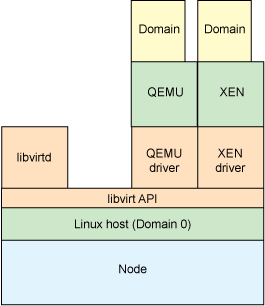
image source: http://www.ibm.com/developerworks/library/l-libvirt/figure3.gif

How to install KVM
There are lots of blog post covering how to install KVM.  I have followed this post to install KVM on my Ubuntu laptop.  One basic prerequisite to run KVM is that the hardware that your Linux is running supports hardware virtualization.  This can easily be find out by typing this on the terminal of a Linux machine.

 egrep -c ‘(svm|vmx)’ /proc/cpuinfo

If it returns a non zero value, the hardware supports hardware virtualization and we can run KVM on this machine.

For working with KVM guest, this post by Scott Lowe is a good start.

Give KVM a try
Personally, KVM is a very good tool for my home lab.  I believe it is also a good option for commercial deployment of  virtualization or cloud infrastructure.  KVM is the most used hypervisor for OpenStack as of today.  (Note: it seems container is becoming more and more popular and lots of development effort is being put in by individual contributors and vendors to make container "enterprise ready" for the virtualization or cloud infrastructure so let see if container will replace KVM).

Sunday, July 5, 2015

VMware – from VM-aware to Application-aware


After catching up with what’s new in vSphere 6 this past weekend, I started to catch up with VMware’s latest announcements.  One of the latest announcements is “Project Bonneville”.  This is project is in the technology preview state and I am hoping that there will be some exciting new announcements on this in the upcoming VMworld 2015.

I think you are all familiar with this logo.  Docker Inc, is the company behind the open source Docker platform.  The Docker platform is an orchestration or packaging tool that allows application and their dependencies to run on container technology.  Container is not a new technology ad we can trace back the origin to FreeBSD Jails back to year 2000. Docker makes it easy for developer and sys admin to deploy application with container technology.  This is just perfect for DevOps as well as Microservices architecture. 

Many of us buy things at www.amazon.com and it is very convenient especially if we also subscribe to the Amazon Prime services.  I ordered my “Mastering VMware vSphere 6” book from Amazon and it was on my desk in one and a half day.  In the pass the web sites for online shopping follow the LAMP stack model with Linux, Apache, MySQL and PHP.  Nowadays the with Docker making the container much more user friendly, there is a new way of deploying an online shopping website with an Microservices model.  The entire website is supported by a bunch of Microservices that has it specific function/purpose.  Each Microservice runs as a container and interface with each other. 

Often time the general view is that when Docker/container technology is becoming more and more mature virtual machine will be phased out.  VMware, however, see this very differently.  Last year at VMworld 2014, it announced project Fargo (now shipped as Instant clone in vSphere 6 for rapidly clone and deploy of virtual machine) where it sets the direction of container at VMware:
VMware + Docker = Best of both worlds.

I had a blog post that talks about this and if you are not familiar with Docker or container technology take a look here as as start.

Benefits of running a VMware infrastructure
I believe you can mention more benefits of running a VMware infrastructure than what I can list out in this post.  It is a matured product and with constant feature enhancements.  It is full of enterprise ready features.

The foremost benefits of a VMware infrastructure I think will be the resource management capability such as vMotion, Distributed Resource Scheduling (DRS)  and built-in fault tolerance.  Monitoring and reporting capabilities will be another benefits.  Last but not least is the rich networking feature that comes with vSphere as well as NSX that support both networking and security for the VMware infrastructure.

Benefits of running Docker containers
These days, more and more companies are running Docker containers in the production environment.  As mentioned earlier, Docker containers are good for DevOps and Microservices architectures due to is lightweight footprint and minimal overhead which make deployment extremely fast.  Another benefit of a Docker container is that it bundles the application and all its dependencies into a single image and can be run on any machine as well as able to share the image with others with the use of a common accessible repository - Docker Hub.
Project Bonneville
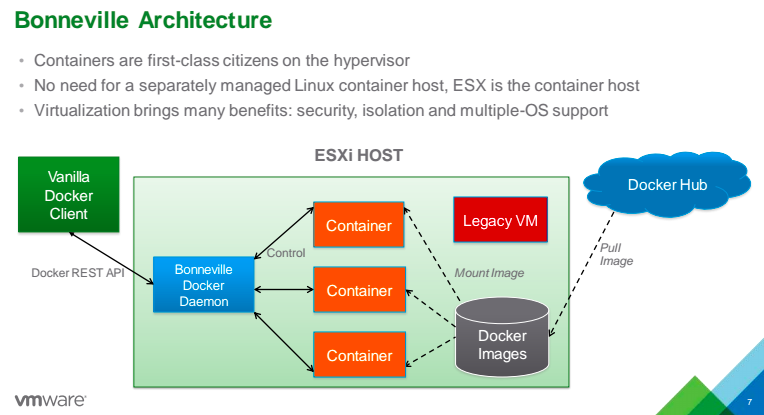
This project in a nutshell is to run Docker container as a virtual machine on an ESXi host.

A picture is worth a thousand words and let's take at look at a presentation from VMware on how Docker fits into ESXi host:

image source: http://venturebeat.com/wp-content/uploads/2015/06/VMware-Project-Bonneville.png


It makes perfect sense to run a Docker container on an ESXi host because it can take advantage of the secure and build-in high availability VMware SDDC infrastructure plus the lightweight, fast startup of a container.  The strong point of VMware is where Docker container is the weakest at this time (at least for now security and networking is where Docker containers need to strengthen the most for it to be enterprise ready)

In OpenStack, the trend is also to run containers just like any other hypervisors in Nova compute.  There is also a OpenStack project - Magnum that integrate container orchestration tools such as Docker or Kubernetes for OpenStack users to deploy containers in the cloud.

Visit here and here for a more detail on Project Bonneville,

Moving toward Application-aware
With Project Bonneville, VMware is making a Docker container running as a virtual machine.  In my last post I have mentioned that VMware is moving toward VM-aware infrastructure and now application can be run as virtual machine and thus VMware is able to be define application-aware policies to facilitate efficient and secure infrastructure.

At the end of the day it is the Application that matters
I have mentioned this again and again that Application is the focus of an infrastructure because the main goal of every infrastructure is to deploy application for various business needs.  Email is a good example of application.  Different IT vendors will converge into an "Application Centric" infrastructure however their marketing department will come up with creative name to describe it.

Friday, July 3, 2015

vSphere 6 – VMware is heading toward VM-aware


VMware vSphere 6 was released in early February 2015.  The must read “Mastering VMware vSphere X” book series for vSphere 6 is already available.  There are tons of blog posts on what is new in vSphere 6 available on the Internet that we can search for.  I had been busy with doing bug fixes for OpenStack right before and after the OpenStack Summit in Vancouver.  My second OpenStack bug fix was submitted upstream and merged last week. It is difficult to have the mind switch between technologies for me.  This is also why I had not published any new blog post lately.  I will try to blog about my experience being an open source code committer in the coming days. 

VMworld 2015 is coming and I predict that there will be lots of new product or feature announcements in the End User Computing area.  Before more new things to learn I have made up my mind to at least catch up with what is new in vSphere 6.

What's new in vSphere 6
The official “what’s new” information page from VMware listed the following:

Compute
  •  Increase Scalability
  • Expanded Support for new chips sets, devices, drivers and guest OS
  • Support for NVIDIA GRID vCPU
  • Instant clone
Storage
  • VM-aware Virtual Volumes
  • Storage Policy-Based Management
Network
  • Per-VM Distributed vSwitch bandwidth reservation
  • Multicast Snooping (IGMP snooping for IPv4 and MLD Snooping for IPv6)
  • Multiple TCP/IP stack for vMotion
Availability
  • vMotion Enhancements
  • Replication-Assisted vMotion
  •  Expanded support for Fault Tolerance (up to 4 vCPUs instead of just one)
Management
  • Content Library
  • Cross-vCenter Clone and Migration
  • Enhanced User Interface
Duncan Epping (@DunccanYB) had a much more detailed summary post on this subject.  For anyone who is involved in VMware related technologies, it is highly recommended to visit his blog "Yellow-Bricks" regularly as there are lots of good contents. According to him the vVol (Virtual Volume) is the “flagship feature” of the vSphere 6 release. I totally agree with Mr. Epping. 

VM-aware is the trend
In fact, if you look at the list of “what’s new”, lots of the items are feature enhancements.  Originally when I write this post the title was “Catching up on what’s new in vSphere 6”.  As I dig into “what’s new”, I see that VMware is making its product VM-aware.  I think it will eventually be heading toward application aware.  I am not an expert in Cisco product (yet).  Cisco is marketing ACI – Application Centric Infrastructure which is also heading toward the same direction.  

There is no new thing under the sun”, both VMware and Cisco and among some other companies are seeing the need to have the data center infrastructure to be application aware so that we can provide the intelligence to run the infrastructure more effectively.  Another important benefit for the infrastructure to be application aware is – SECURITY. 

At the end of the day, the ultimate goal of having a data center infrastructure is to run business application so that a business entity can earn money.  It is the application that we want it to run efficiently and securely.

To have the infrastructure VM-aware or even application aware, it must be agile so that it can react to the dynamic changes.  vMotion is one example of dynamic changes.

Policy
Software Defined Data Center (SDDC) is the first step of providing support for VM-aware infrastructure.  With software providing an abstraction level to all the elements of the data center, operators/administrators can automation changes as well as to define policies which are the rules of how things should happen according to specified characteristics of a virtual machine.  The technology is still advancing and we can look at the defined policies as being the intelligence of the infrastructure.  The entire data center infrastructure, be it storage or networking reacts to changes according to the defined policies.  One common theme about the characteristics of a policy is that it is “declarative”.  Policy being “declarative” only specifies the end result and not how to attain the result.

Industry Convergence
In the OpenStack world, VMware is investing heavily on a project call “Congress” while Cisco is investing on “Group based policy”, it is interesting to see how the IT industry converge into a common way of providing an infrastructure for business application to run both efficiently and securely.

Reference:
 "VMware Virtualization for Desktop & Server, Application, Public & Hybrid Clouds | United States." VMware Virtualization for Desktop & Server, Application, Public & Hybrid Clouds | United States. N.p., n.d. Web. 03 July 2015.

Wednesday, June 3, 2015

Navigating through the VMware's forest of product offerings

Back in 2008 when I first started to learn about VMware's server virtualization technology, it is very confusing on the different products and how they are related together.  There are the ESX, ESXi, vSphere and vCenter server and there are older products such as VMware server or the GSX server.  With Google we can find lots of articles on these products but the problem is that most of these articles do not have a date and since the VMware virtualization technology is advancing in such a high pace, we do not know if the information was current or relevant to which version of vSphere.

Now in 2015, can you tell me all the current VMware products and how they are related?

To look at VMware's product offering, it is best to look at VMware's vision on data center - Software Defined Data Center architecture.

Data Center comprises of these functions:
  1. Compute
  2. Storage
  3. Network
  4. Management
VMware’s idea is to provide an abstraction layer for compute, storage and network hardware so that the entire data center is software driven.   

The advantage of a Software Defined Data Center architecture is that the data center can be more agile as the hardware resources are provisioned or withdraw on demand to the compute, storage and network resources.  This agility factor has huge implication to IT operations in a data center:
  • More cost effective
  • Ability to service user demand much faster
  • Provide a stable platform for DevOps
  • Eliminate or minimize human error
  • Make Disaster Recovery easier thus able to improve RTO and RPO.
The benefits of a Software Defined Data Center architecture is not limited to the above mentioned points and it is not the main point for this article.

VMware vCloud Suite is VMware's solution to provide a "Software Defined Data Center" for customers. As shown in the diagram below vCloud Suite comprises of:
  • Compute
  • Storage and Availability
  • Management and Automation
  • Network and Security (add on feature)
Each of these different products under the above mentioned categories can be deployed separately and as a whole they formed the vCloud Suite.
image source: http://www.vmware.com/files/images/thumbnails/vmw-scrnsht-vcloud-suite-mgmt-lg.jpg

Compute
At the heart of the vCloud Suite is the vSphere Suite that provide the virtualization infrastructure for different business establishments from SMB to enterprise to cloud operators. I don't think I need to describe much about the vSphere Suite as this has been around for a number of years and are widely deployed.

Management and Automation
The VMware vRealize™ Suite provides the management and automation capability for the Software Defined Data Center architecture.

Basically, the vRealize Suite comprise of Automation, Operations and Business and Log Insight for monitoring.
image source: http://cloudmaniac.net/wp-content/uploads/2014/10/vmware-vrealize-suite.jpg

Note:
  • vRealize Operations is formerly known as vCenter Operations Management Suite or vCops
  • vRealize Automation is formerly known as vCloud Automation Center or vCAC
  • vRealize Business is formerly known as IT Business Management Suite
  • vRealize Log Insight is formerly know as vCenter Log Insight
For a more comprehensive and detailed description of the vRealize Suite, this VMware site is a good place to visit.

VMware vRealize Suite consists of the following products:
  • VMware vRealize™ Automation™ Advanced or Enterprise
  • VMware vRealize™ Operations™ Advanced or Enterprise
  • VMware vRealize™ Log Insight™
  • VMware vRealize™ Business™ Standard
  • VMware vRealize™ Business™ Advanced or Enterprise
Storage and Availability
For all IT operations, disaster recovery is an important element.  Each business should defined the Recovery Time objective (RTO) and Recovery Point Objective (RPO) for acceptable level of disruption in case of a disaster event affecting the continuous operation of the IT infrastructure. Most importantly DR plans needs to be tested.  VMware vCenter Site Recovery Manager provide customer the ability to automate and orchestrate non-disruptive testing of recovery plans. With automation and orchestration, the RTO and RPO can be improved.

image source: http://ddf912383141a8d7bbe4-e053e711fc85de3290f121ef0f0e3a1f.r87.cf1.rackcdn.com/2.17%20vcenter.png

For more comprehensive and detailed description of VMware vCenter Site Recovery Manager visit here.

I am not sure why VMware group storage and availability into the same category because availability also include the compute and networking pieces that support the application that we are ultimately concern with.

Regarding storage, VMware had been working on abstracting the storage hardware and to provide an easy to configured Software defined Storage products.  In this area, VMware is taking 2 approaches:
  1. Virtual Data Plane - Virtual SAN (VSAN) and vSphere Virtual Volume (vVol)
  2. Policy Driven Control Plane - Storage Policy Based Management
There are many other blog post talking about these products. This blog post is meant to provide an overview and how these products related to each other.

Network and Security
This is an add-on to to the vCloud Suite.  In this category is the NSX - VMware's way of providing an abstraction layer to the physical network as well as some L4 - L7 network services.

NSX is also a security product as I have talked about in my previous post.

Brad Hedlund (@bradhedlund, Engineering Architect at VMware's Network and Security Business Unit) has an good article on what network virtualization is


image source: http://commondatastorage.googleapis.com/bradhedlund/blog/what-is-network-virtualization/What_is_Network_Virtualization.PNG

NSX virtualized the network as well as network functions such as load balancing, firewall and VPN. Any Cloud management platform including OpenStack can interact with NSX via RESTful API to provision network services for the cloud platform.  

NSX has two flavors as I have outlined in this post.  One flavor is tailor toward vSphere product and the other one is for non VMware hypervisors such as KVM.  

One point worth mentioning is that NSX can optimize the VXLAN multicast traffic because the NSX Controller is able to distribute the MAC address and VXLAN ID mapping to the various VTEPs instead of using bi-directional PIM as defined in RFC 7348 (I have a summary of this RFC here).  Multicast traffics takes up network bandwidths and network administrators always try to find ways to eliminate multicast traffic.

Other VMware products
For a complete list of VMware products we can find them here. In this post I have not talked about the End-user computing product of VMware - Horizon nor the VMware hybrid cloud product - VMware Air which is the VMware's offering of public cloud similar to Amazon's AWS, Google's Cloud platform or Microsoft's Azure.

I hope this will clarify VMware's product offerings and how they relate to each other.