Often time there is the notion that with Docker, the Linux
Container technology is going to replace server virtualization. The reasoning for this thought is that with
Linux Container virtualize application on the operating system level in which the
hypervisor is no longer needed.
Another camp of thought is that container does not have the
robustness and enterprise ready feature such as resource allocation management,
high availability or even manageability that can be offered by VMware.
In VMworld 2014, VMware CEO Pat Gelsinger on his keynote
session announced the collaboration of VMware, Google and Docker in the
Software Defined Data Center (SDDC) sighting that running Docker on a virtual machine is the
best of both world giving user a lot more flexibility and benefits.
What is Docker
Docker,
Inc is the company behind the open source Docker platform.
Docker is an orchestration or packaging tool that allows
applications and their dependencies to run on container technology.
According to this
article Docker consist of:
- Docker Engine – a
portable, lightweight run time and packaging tool.
- Docker Hub – a cloud
service for sharing application and automating workflow.
It is all about:
APPLICATION.
Before we dig deeper into Docker we have to look into the
container technology.
Container
Container is not a new technology.
We can trace the origin to
FreeBSD Jails back to year 2000 where
programs are run in a sandbox.
Solaris
(now part of Oracle) has this implemented as zones.
We can look at container as operating system level
virtualization in which application in a container is isolated from each other
but are running on the same operating system which is on a single host.
Google has its own version of container –
Imctfy
and is being used heavily to support Google Search Engine, Gmail and other
Google applications.
Native Linux has container build upon cgroup and namespaces
but it is not so easy to deploy application with LXC and thus this technology
is not popular in the enterprise space. Docker is making this much easier both for
developer and sys Admin to deploy application with the container
technology.
Once an application is “Dockerized”, it can be run on any
platform as long as the OS is the same as the container is created. Now we can deploy container on-premises
(private cloud) or move it to the public cloud such as Amazon Web Services or
Google Cloud Computing.
Popular Configuration Management Tools such as Puppet and
Chef can work with Docker and this made the deployment process even easier and Docker a perfect fit for DevOps.
Docker Components and Technologies
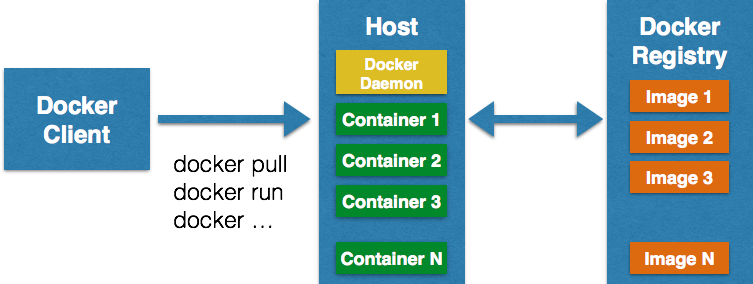
Docker operates on a client and server model. The Docker client and server/daemon can be on
the same host or different host. The Docker client communicates with the Docker
server/daemon using REST API.
This diagram captures the core components of Docker:
Docker Client
- Accept commands from the user and communicate with the
server/daemon
Docker Server/Daemon
- Building the Docker container from the images that are
stored in the Docker Registry
Docker container
- Base unit where the application runs on
- Similar to a Virtual Machine
Docker image
- Building block of container
Docker Registry
- Location where the Docker images are stored
- Public registry – access by everyone
- Private registry – access by specific team or organization
Red
Hat has a good description of Docker fundamental components:
· Container – an application sandbox.
Each container is based on an image that holds necessary configuration
data. When you launch a container from an image, a writable layer is added on
top of this image. Every time you commit a container (using the docker commit
command), a new image layer is added to store your changes.
·
Image
– a static snapshot of the containers' configuration. Image is a read-only
layer that is never modified, all changes are made in top-most writable layer,
and can be saved only by creating a new image. Each image depends on one or
more parent images.
· Registry
– a repository of images. Registries are public or private repositories that
contain images available for download. Some registries allow users to upload
images to make them available to others.
· Dockerfile
– a configuration file with build instructions for Docker images. Dockerfiles
provide a way to automate, reuse, and share build procedures.
Along with the components let’s take a look at the
technologies that make Docker works:
Namespaces
Linux namespaces provides isolations for each
container. Applications or process inside
a container do not have access outside of the namespaces that the container is
in. There are different namespaces and
examples are pid, net, ipc, mnt or uts.
Control groups/cgroups
While namespaces provides access isolation, the control
groups limits the hardware resources that the container can access. One example of control groups is to limit the
memory available for the container for say 256 MBs.
UnionFS
This is how containers are made to be light weighted. Linux kernel first mounts the root system
read-only and then change to read-write.
With the union mount, instead of changing from read-only to read-write,
a read-write file system is layered on top of the read-only based Filesystem. Union
mean to layer read-write with read-only layers.
Containers
Linux container (
LXC)
is an essential technology that Dockers uses.
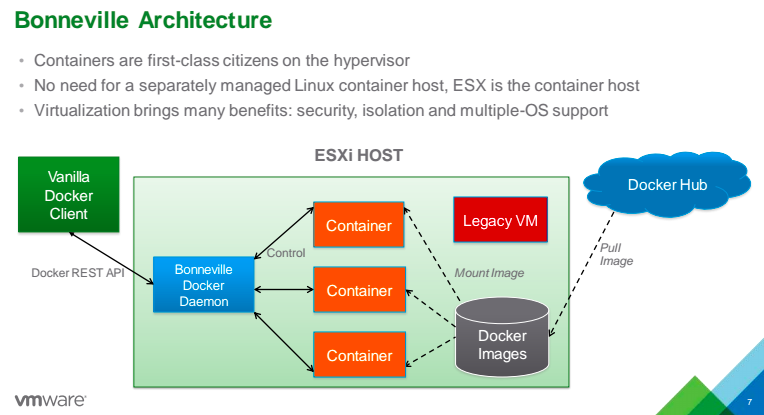
VMware Project Fargo
So how does VMware embrace Docker?
If you want more information about how VMware uses
Docker this
blog post
is a good start.
In VMworld 2014, VMware announced Project Fargo (currently
in beta as of this posting).
Project Fargo according to the blog post from the blog post
mentioned is “a technology to provide a
fast, scalable differential clone of a running VM” and it is particular
useful in a VDI environment. In fact, it
is to make Docker containers to run faster on a VM than they are running on a
native Linux machine.
This is how VMware
is saying: VMware + Docker = Best of both worlds.
More information about Project Fargo can be found here,
here
and
here.